15.1 General Description
The Sony ILX-LR1 camera supports AGROWING multispectral lenses - specialized optics that divide the sensor frame into several narrow-band spectral channels simultaneously. This makes it possible to obtain data for precision agriculture, vegetation condition monitoring and calculation of vegetation indices (NDVI, etc.) without a separate multispectral camera.
Three lenses are available for the ILX-LR1 camera:
- AGROWING Quad 25mm - 4 lenses in one housing, the frame is divided into 4 parts (2×2);
- AGROWING Quad 55mm - the same frame layout as Quad 25mm, with long-focus optics for surveying from high altitudes (High-Altitude);
- AGROWING Sextuple 21.8mm - 6 lenses in one housing, the frame is divided into 6 parts (2×3).
AGROWING kits for ILX-LR1 (names and part numbers according to the Agrowing 2026 price list):
| Kit | Part number | Contents |
|---|---|---|
| Sony Alpha ILX-LR1 25mm Quad Kit | ILXLR1025 | modified Sony ILX-LR1 camera, Quad 25mm lens, UV/IR cut 615 nm filter |
| Sony Alpha ILX-LR1 55mm Quad Kit | ILXLR1055 | modified Sony ILX-LR1 camera, Quad 55mm lens, UV/IR cut 615 nm filter |
| Sony Alpha ILX-LR1 Sextuple Kit | ILXLR1421 | modified Sony ILX-LR1 camera, Sextuple 21.8mm lens, UV/IR cut filter, ColorChecker Classic calibration target |
| Quad 25mm lenses Kit | EM61FF1025 | Quad 25mm lens (without camera) |
| Quad 55mm lenses Kit | EM61FF1055 | Quad 55mm lens (without camera) |
| Sextuple 21.8mm lenses Kit | EM61FF1421 | Sextuple 21.8mm lens (without camera) |
A lens without a camera can be installed only on a modified camera.
Each part of the frame is captured through its own filter with three narrow bands (R, G, B). Therefore, an image taken with an AGROWING lens looks like a set of colored fragments of the same scene - this is normal and is not a defect.
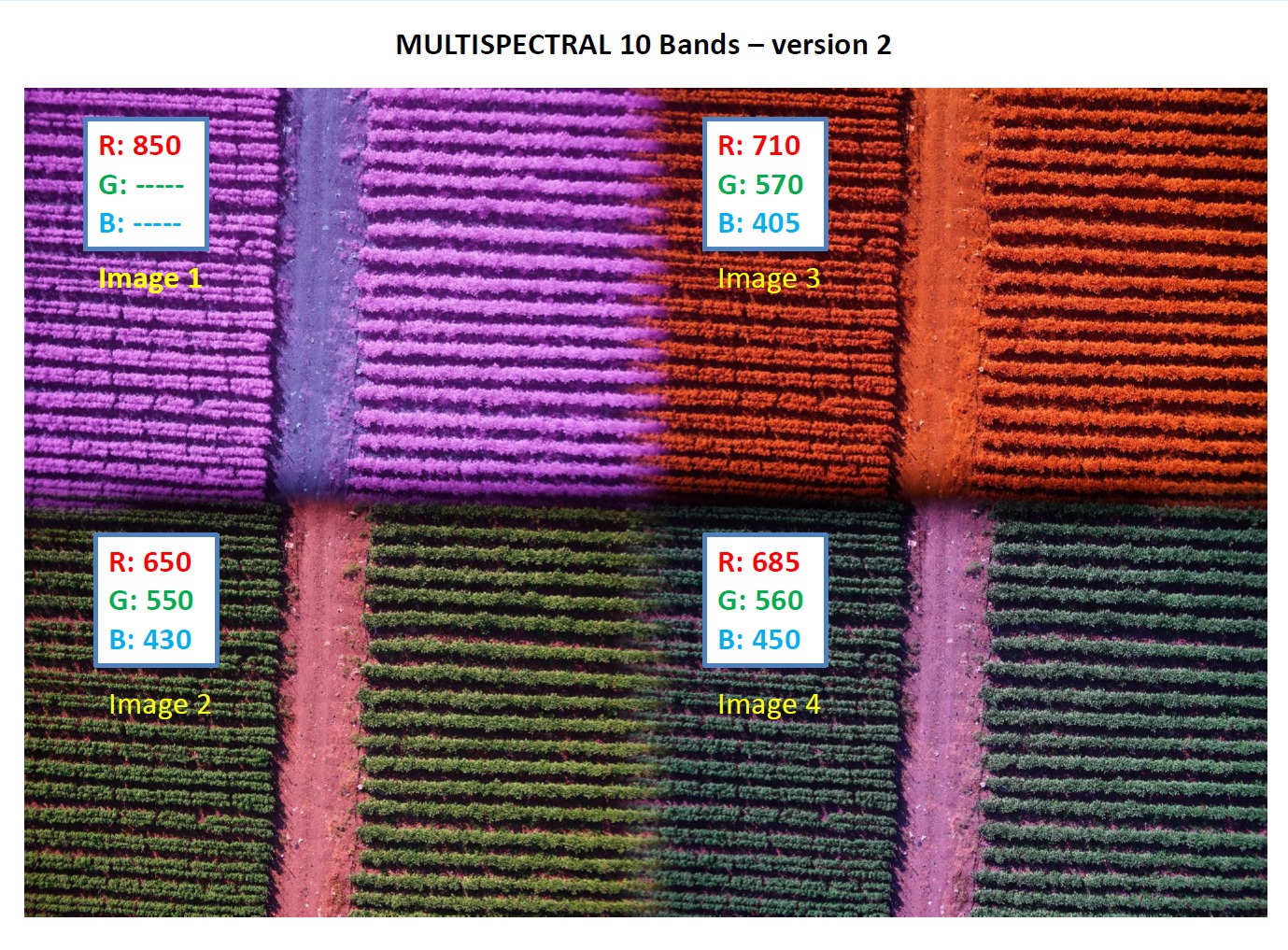
Example of an image taken with the Quad lens: 4 fragments, each with its own R/G/B bands, nm.
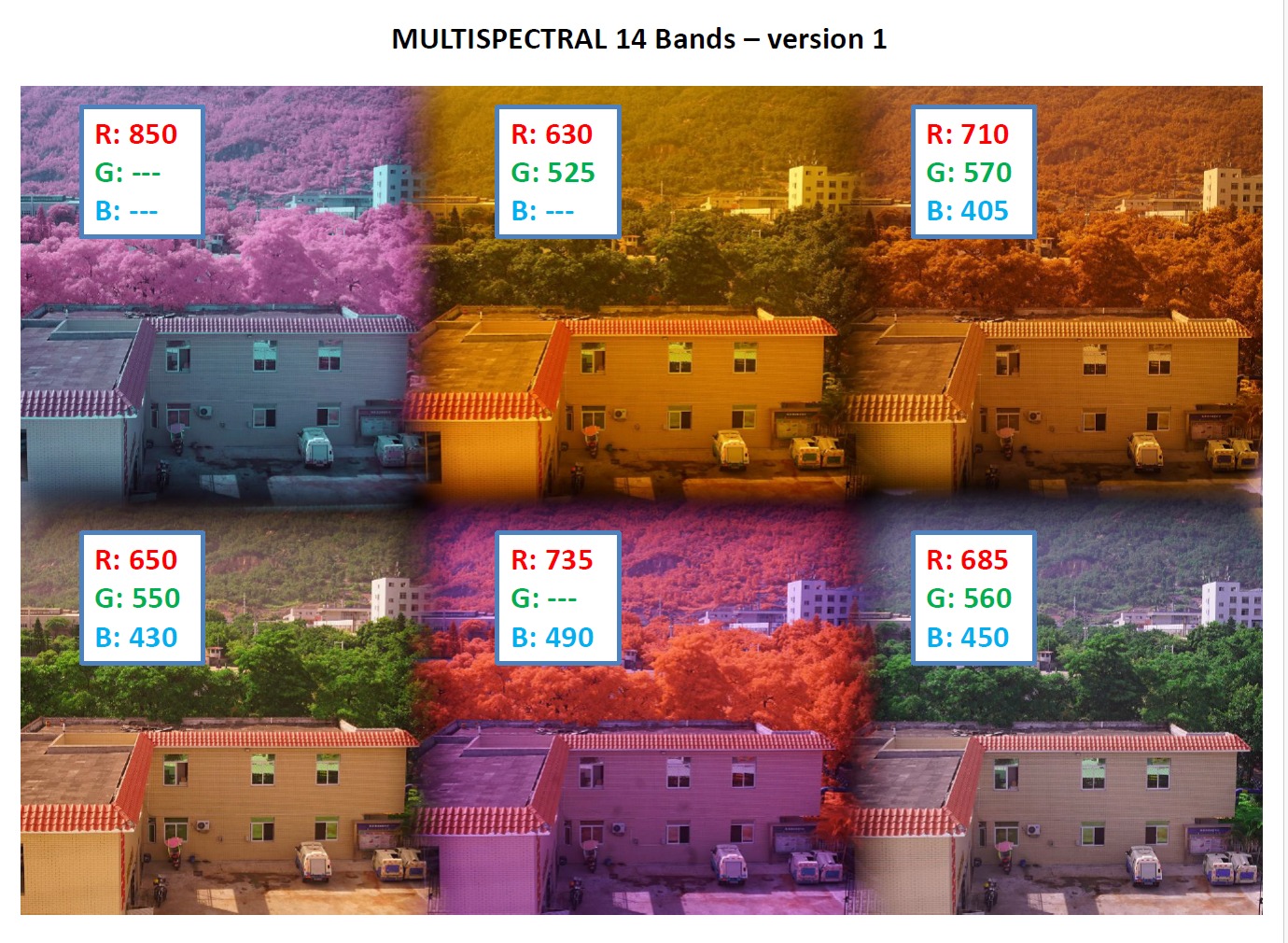
Example of an image taken with the Sextuple lens: 6 fragments, each with its own R/G/B bands, nm.
The lenses are dual-purpose: with a clip-in UV/IR-cut filter, they can also be used for conventional shooting in the visible range (see chapter 15.4).
The camera for AGROWING lenses is modified to increase the sensor sensitivity to the spectra that form the multispectral image.
AGROWING lenses are precision optics with fixed channel alignment. Protect them from shocks and drops, do not disassemble them, store them only in protective cases.
15.2 Lens Specifications
| Specification | AGROWING Sextuple 21.8mm | AGROWING Quad 25mm | AGROWING Quad 55mm |
|---|---|---|---|
| Type | E-mount, for modified Sony ILX-LR1 | E-mount, for modified Sony ILX-LR1 | E-mount, for modified Sony ILX-LR1 |
| Bands (base configuration), nm | 14: 405, 430, 450, 490, 525, 550, 560, 570, 630, 650, 685, 710, 735, 850 | 10: 405, 430, 450, 550, 560, 570, 650, 685, 710, 850 | 10: 405, 430, 450, 550, 560, 570, 650, 685, 710, 850 |
| Bands with optional filters, nm | 405, 430, 450, 470, 490, 525, 550, 560, 570, 630, 650, 685, 710, 735, 795, 850 | 405, 430, 450, 470, 490, 550, 560, 570, 650, 685, 710, 795, 850 | - |
| Channel resolution | approx. 7.2 MP (2780 × 2650 px) | approx. 12.1 MP (4304 × 2836 px) | approx. 12 MP |
| Focal length, mm | 21.8 | 25 | 55 |
| Focusing | manual, 0.5 m - ∞ | manual, 0.5 m - ∞ | manual, 0.5 m - ∞ |
| Aperture | F5.6, fixed | F6.0, fixed | F6.2, fixed |
| Field of view D / H / V, ° | 40.8 / 33.0 / 25.0 | 46.0 / 40.7 / 27.6 | 22.4 / 18.5 / 12.4 |
| Distortion (TV distortion) | -1.5% | -1% | - |
| Relative illumination | 60% | 68% | 70% |
| Lens size (Ø × length), mm | 64.5 × 35 | 64.5 × 31.5 | 64.6 × 31.5 |
| Lens weight, g | 190 | 190 | 181 |
| Camera weight with lens, g | 433 | 433 | 424 |
| Shooting in the visible range | with clip-in IR-cut filter | with clip-in IR-cut filter | with clip-in IR-cut filter |
Each band is ±20 nm wide (FWHM). "Bands with optional filters" lists all bands available when filters are replaced with optional ones (see chapter 15.3). Field of view: D - diagonal, H - horizontal, V - vertical. Source: for Sextuple 21.8mm and Quad 25mm - the Agrowing datasheet for ILX-LR1, for Quad 55mm - the agrowing.com product page (ILX-LR1 55mm). "-" - value not specified by the manufacturer. The resolution is given in effective Sony sensor pixels after demosaicing, channel alignment and cropping. The specification is subject to change by the manufacturer (patent US 10574911B2).
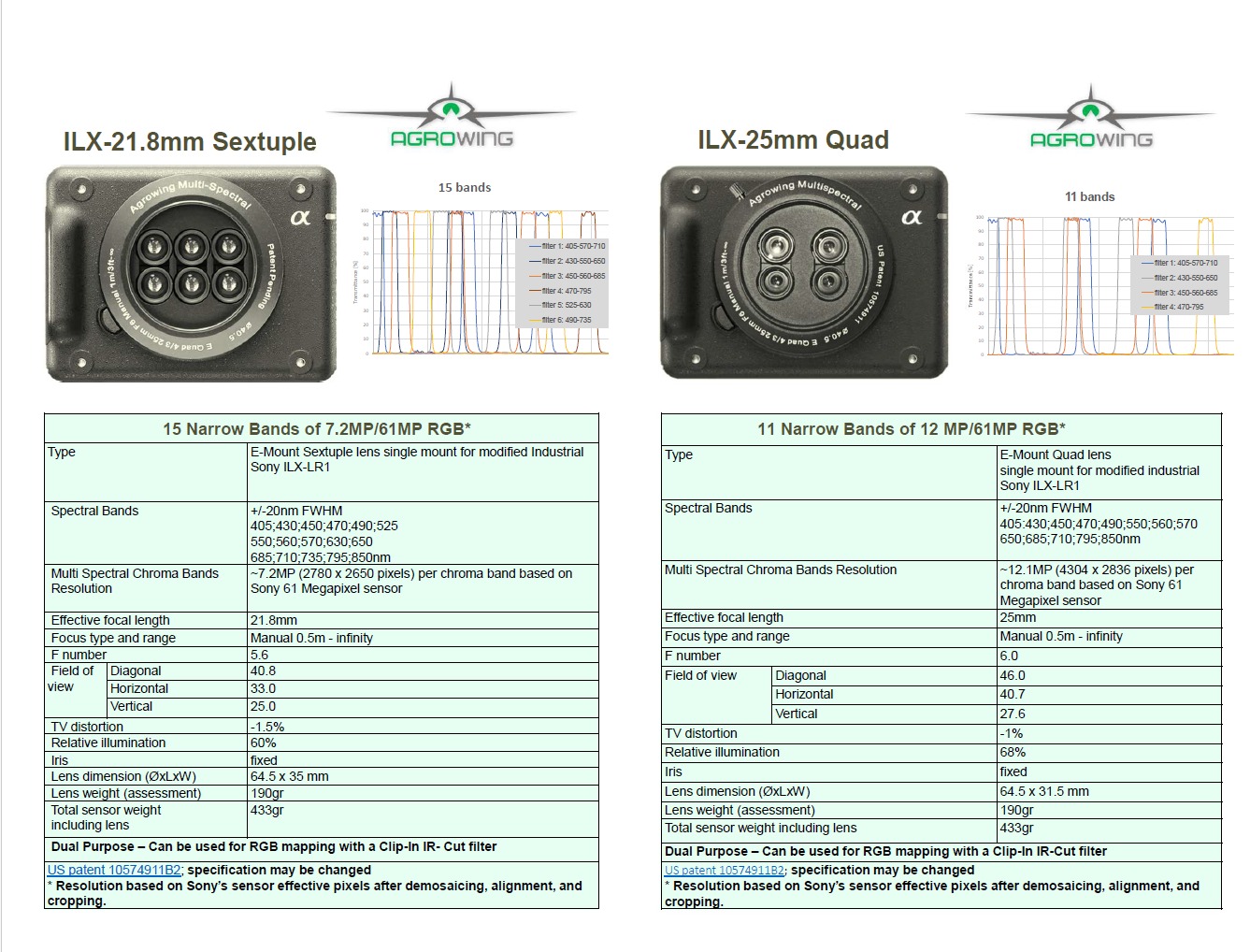
Datasheet of AGROWING Sextuple 21.8mm and Quad 25mm lenses for ILX-LR1.
15.3 Filter Combinations
Each lens has a base filter configuration. Some filters can be replaced with optional ones before purchasing the lens if the objects being surveyed are better distinguishable in a particular spectrum.
| Lens | Base configuration (R/G/B, nm) | Optional filters (R/G/B, nm) |
|---|---|---|
| Quad 25mm | 850/-/-, 650/550/430, 710/570/405, 685/560/450 | 710/570/480, 795/-/470, 630/525/-, 735/-/490 |
| Sextuple 21.8mm | 850/-/-, 650/550/430, 630/525/-, 735/-/490, 710/570/405, 685/560/450 | 710/570/480, 795/-/470 |
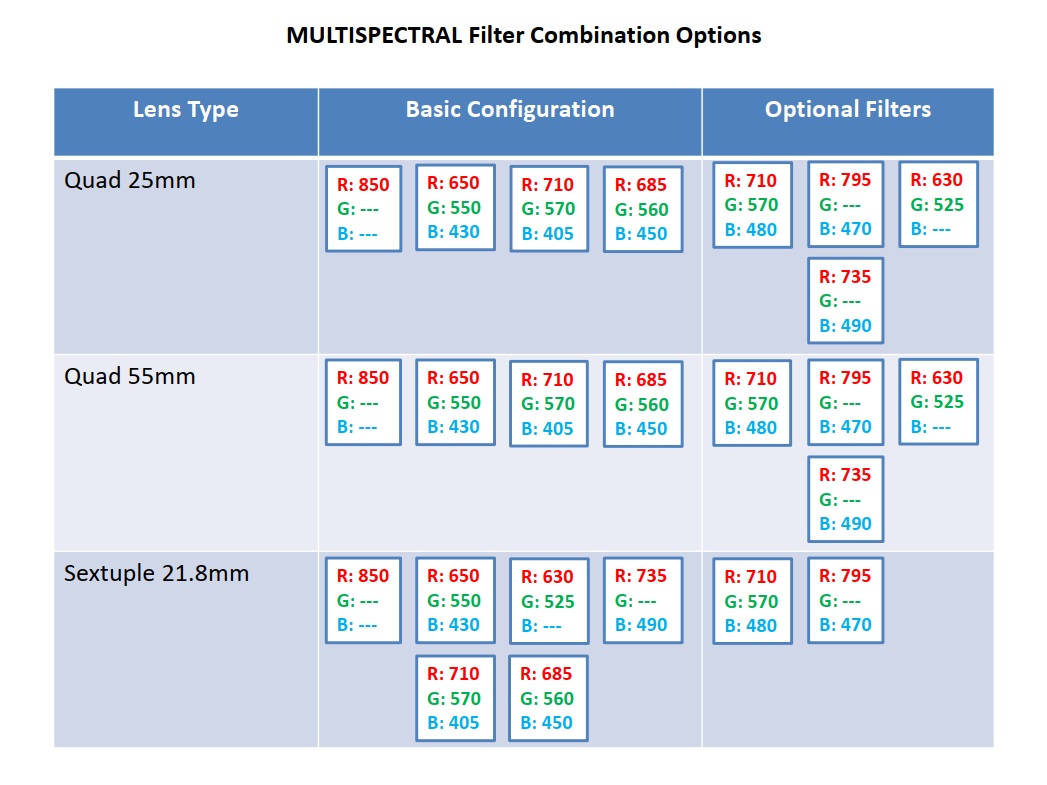
Table of AGROWING filter combinations (manufacturer).
The choice of filter combination depends on the task (chlorophyll assessment, water stress, vegetation indices). For a recommendation on selecting bands for a specific crop and task, contact TOPODRONE technical support.
15.4 Shooting in the Visible Range (RGB)
Because the camera is modified, shooting in the visible range requires the quick-release UV/IR Magnetic Clip-In Filter for Sony E-Mount, which is installed between the lens and the sensor. Without it, color distortion is possible. Installation takes less than a minute:
- Press the lens release button with a thin object and remove the lens.
- Install the UV/IR Magnetic Clip-In Filter for Sony E-Mount.
- Install the lens for shooting in the visible range.
Remove the filter before reinstalling the AGROWING lens - otherwise the AGROWING lens can damage it.
15.5 Shooting Settings
Shooting parameters are set in the Payload Settings panel (see chapter 8.3). AGROWING lenses have manual focus (0.5 m - ∞) and a fixed aperture. Shoot in JPEG format - it is processed by TOPOSETTER and TOPOMAPPER.
15.6 Multispectral Data Processing
Multispectral data is processed in the same TOPODRONE software.
Stage 1. Camera center coordinates. In PPK mode, perform processing in TOPOSETTER (chapter 14.1). In RTK mode, this stage is not needed.
Stage 2. Processing in TOPOMAPPER.
- Drag the flight folder into the TOPOMAPPER window. The multispectral lens (Sextuple, Quad 25mm or Quad 55mm) is detected automatically: a "Multispectral images" notification appears with a list of wavelengths.
- Perform the alignment.
- Build the dense cloud, DSM and DTM as in chapter 14.2.
- Build the multispectral orthomosaic: 14 bands for Sextuple, 10 for Quad 25mm and Quad 55mm.
- Calculate the vegetation indices. For Sextuple, 15 indices are available: NDVI, GNDVI, NDRE710, NDRE735, SAVI, OSAVI, MTCI, CIre, CIgreen, PRI, ARI, MCARI, TCARI/OSAVI, NDWI, VARI. For Quad - those whose bands are present in the lens.
For information on vegetation indices, see the TOPODRONE knowledge base (topodrone.com/knowledge).