As a base model, the TOPODRONE DJI Mavic 2 Pro PPK requires compass calibration (CC) every time the location changes. CC allows the drone to calibrate to the local magnetic field lines. During CC the accelerometer and compass are rotated twice about two different axes. The drone then corrects itself based on the readings of both sensors. For correct CC, do the following:
- CC is performed immediately before the flight in an open area. Performing CC indoors is pointless.
- Remove the gimbal clamp and unfold the drone arms.
- Switch on the drone and the remote controller, insert and connect the mobile device.
- Make sure there are no large metal structures or magnetic fields within 50 meters.
- Switch the drone to CC mode. This can be done in two ways:
a) In the DJI Go 4 app, select MC Settings / Advanced settings / Sensors state / Compass / Calibrate compass / OK
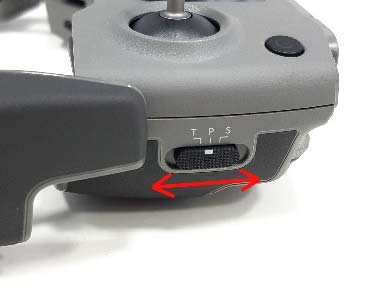
b) Quickly toggle the switch on the right of the remote controller between positions S and T at least four times. - Make sure the rear LEDs of the drone are solid yellow.
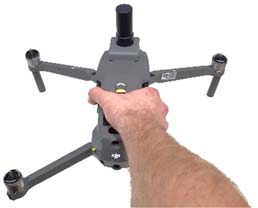
- Take the remote controller in your left hand and the drone in your right. Hold the drone by its top and the battery. Do not change the drone's position!
- Rotate the drone to the left (counterclockwise) by 380 degrees (slightly more than 1 full turn). Stop when the rear LEDs change from solid yellow to solid green.
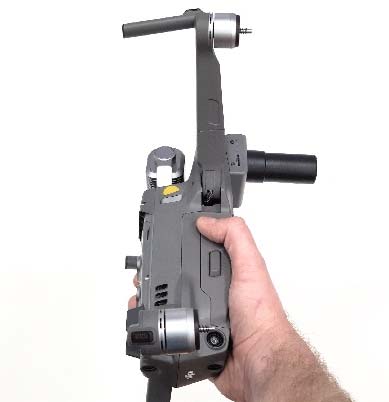
- Change the drone's orientation by rotating it 90 degrees about the longitudinal axis.
- Rotate the drone to the left (counterclockwise) by 380 degrees (slightly more than 1 full turn).
Stop when the rear LEDs change from solid green to blinking green. - If method 5a was used to enter calibration mode, set the flight mode switch to
position P (center). This is very important! - Compass calibration is complete.
Before and after CC you can check the level of electromagnetic interference in the DJI Go 4 app – after CC it should be in the green zone. If the system reports a CC failure (rear LEDs blink red), calibrate at another place nearby.
The pilot's clothing must not contain magnetic or ferromagnetic items such as large jewelry, metal inserts, magnets on an iPad cover, etc. Otherwise, even after a successful CC, your drone will report a “Compass Error” after take-off.
CC improves the drone's flight stability. However, a “Compass Error” may occur even after correct calibration. It is usually caused by other sources of interference, such as metal structures, large antennas or power lines.