To set the laser scanner sensor beam calibration, go to the Settings tab, then select Lidar Scanning and select the Lidar Calibration option from the drop-down list. Then select the model of your laser scanner.
In the window that opens, you will be able to turn off unnecessary beams or adjust the necessary calibration values.
Important Note: Laser scanners manufactured by TOPODRONE are factory calibrated and do not require recalibration during their entire lifetime.
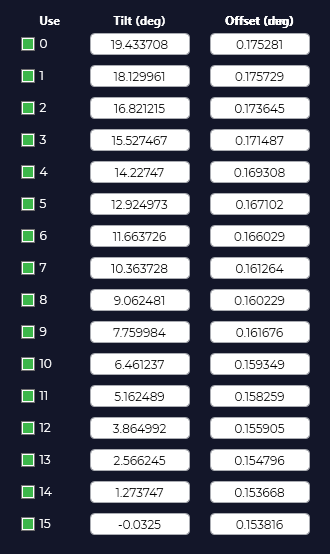 | Use – beam number Tilt (deg) – beam angle in degrees Offset (mm) – beam offset relative to the sensor in mm. The number of lidar beams depends on the model of your laser scanner and may vary depending on the type of device. |